← The BlogMAY 12, 2026
Development
Webflow vs Self-Hosting in the Age of AI Coding Agents
Is Webflow still worth it with Claude Code and Codex? See why self-hosting is cheaper and more performant, but Webflow can save significant time.

Is Webflow still worth it with Claude Code and Codex? See why self-hosting is cheaper and more performant, but Webflow can save significant time.
AI coding tools like Claude Code and Codex make building and self-hosting a website easier than ever, but is it better to use platforms like Webflow, WordPress, or Squarespace, or build and host it yourself? We did both and found the self-hosted option was cheaper and more performant, but took longer to build than we expected.
So the trade-off is time versus cost, and which you prefer may be up to you. I built this website Orange Radish with Claude Design, Claude Code and Webflow, and our first app site gamecaller.app with Claude Design, Claude Code, and fully self-hosted it on Google Cloud.
After building one site each way, I would still choose Webflow over self-hosting for most marketing sites. The self-hosting saved about $300 a year, but it cost a lot more time. Let’s get into the reasons below.
First, we should review exactly what we did to build the sites. Let’s start with what’s the same for each one:
Branding
Fonts and color palettes were made in Claude Design. Claude Design enables easy iteration on these ideas to see many options and settle on what you like.
Logos and Icons
I still find Claude to be lacking generally on image generation compared to OpenAI and ChatGPT. Claude Design always tries to make logos, but I often find them uninspiring and it’s not able to iterate well, so I use ChatGPT for this step and then add them as assets to the Claude Design project.
Website Page Design
Claude Design is the primary for this. I use it to explore many different design options for each page and then select the ones that best fit our goals.
Website Build Out
Claude Code is the primary tool for this phase, whether the target deployment is a self-hosted static page or a platform like Webflow, Squarespace, or WordPress.
What’s different about Orange Radish
What’s different about GameCaller
So the full website design and build was done with an AI toolchain using Claude with a few custom skills and then a self-hosted site for GameCaller on GCP and Webflow for Orange Radish.
If you want to skip the rest of the article, here are the key takeaways from building the same design both ways:
While the cost savings are very real, at least at lower traffic volumes the money saved didn’t really justify the extra time spent in my opinion. Though now that the infrastructure and site architecture have been successfully built once, I’m sure we could build a new website on the same design much faster.
The gap between the two options was large. For our websites to handle about 100,000 monthly visitors Webflow would cost $540 while Firebase hosting would cost about $42, roughly a 12x difference. Let’s look at how that cost breaks down.
Firebase Hosting currently offers 360 MB for free and then charges $0.15 per GB for data transfer, based on their currently posted pricing in August of 2026.
When building the self-hosted site, we built an adversarial review agent that reviewed all code changes and set size budgets per package, forcing a real decision every time anything large was added to the site. This resulted in the final site being very optimized at about 600KB. We also turned down several optimizations like reducing the number of fonts that could have dropped it more just to move the project along at a faster pace. The site also caches all the large items (fonts and images) so that return users have to load less.
On the free tier we can serve roughly 1,000 first-time visitors per day, or about 31,000 return visitors per day, since cached fonts and images mean returning visitors download only a fraction of the page weight. To serve 100,000 first time visitors would cost about $3.50.
Webflow’s cheapest CMS plan costs $300 per year before you serve a single visitor as of August 2026. While the sites aren’t apples to apples as the content is different, the Webflow site is about 2-3x larger when served and for 100,000 users would need Webflow’s 100 GB a month plan which costs $540 annually.
So, price for annual hosting for 100,000 monthly users self hosted: $42, Webflow: $540, about a 12x difference in price.
The cost difference is real: over 12x.
Site performance is critical to how Google and other search engines rank your site, and also its discoverability to AI agents as they also leverage web search to find content and information. We were able to hit near perfect metrics in Lighthouse for our self-hosted site, quite a bit better than what we got with Webflow. We’ll step through this below.
Specifically I’d recommend having three review agents that are part of the development process, looking at all code changes as build and proposing changes.
The combination of these 3 review agents helps guarantee good numbers when you finally have the full site built and it hits this performance benchmarking step.
The end result is that it's pretty easy to get good scores. In this case we were able to get perfect 100’s, although on other runs we might get mid to high 90’s on the performance metric.
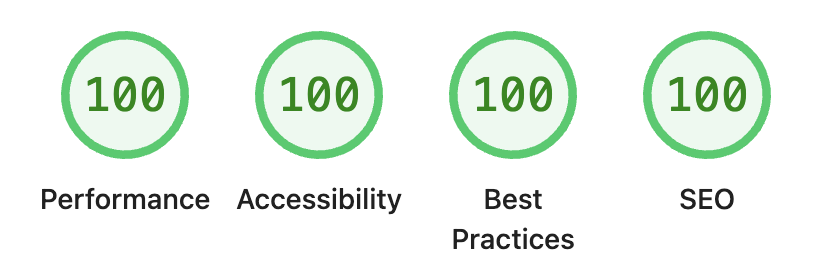
Lighthouse metrics for gamecaller.app, self hosted site.
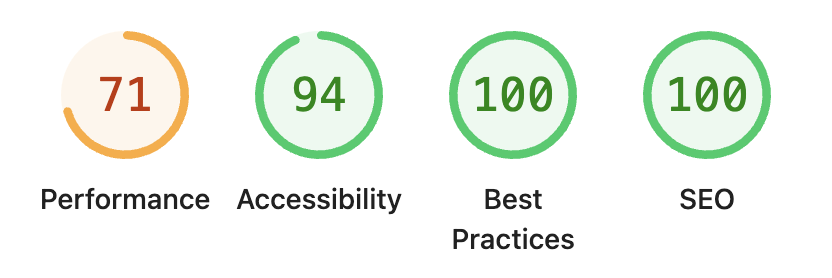
Compare this with a lighthouse run on the Webflow site.
Lighthouse metrics for orangeradish.com hosted on Webflow.
Verdict: self-hosting wins on performance. The self-hosted site hit a perfect 100 across all four Lighthouse categories versus 71 for performance on the Webflow build, and a 94 on accessibility.
This is the real issue with the self-hosting option. With Webflow, I was able to turn a Claude Design into a published website in an afternoon. For the self-hosted site this took much longer. Most of that time wasn’t really spent in building out the page content, it was spent in infrastructure, creating the hosting solution, creating the deploy and publish flows, and designing the site architecture.
These steps took much longer than expected. I will note that once all of the machinery was in place, building the pages was relatively quick. Not as fast as Webflow, but I’d still say 80% or more of the time was building the infrastructure and architecture of the site.
If we were to build a second site on the same structure for self-hosted option, I’m optimistic this would be faster.
Verdict: Building with Webflow was much faster from developer time spent than going self-hosted.
AI eliminates much of the coding work, but it doesn't eliminate all the decisions, debugging, configuration, deployment, and edge cases involved in owning the entire stack. Even if you hand most or all of this off to an agent, the number of agentic loops to get it right was fairly high.
Is this really a problem? If you are building a website for your primary job, probably not. The total time spent is still substantially less than this would have cost in the pre-AI era. If you are doing this for a side-project or a hobby, there is a real question as to whether you want to pay for the time savings or not.
I think this is a really important question. If you, the builder, are going to maintain the website going forward then using the self-hosted static site option is perfectly fine. It’s relatively easy to add new pages, and copy editing is fairly simple, it’s done in markdown files.
However if you are handing this off to a less technical person who may not be comfortable opening a coding IDE or CLI coding agent to update pages, then Webflow, Squarespace, WordPress, and other hosted platforms offer a simple CMS interface where it’s easy to build new content.
Also Webflow with its MCP tools will allow Claude Chat and ChatGPT sessions to make site changes, rather than having to move to Claude Code or Codex to create new content in the CMS driven components.
Coding agents make custom development cheaper, but platforms like Webflow still package dozens of solved problems that you otherwise have to recreate or maintain yourself.
MCP is not optional when working with hosted platforms. If they don’t have this option, you are stuck designing an agent that will work with the web UI interface the service provides. This is the case with a platform like Squarespace, which does not have an official MCP server. Working through the web UI is fragile and also opens up risk about mistakes that can be made in the web editor with big consequences.
It also limits the ability for less technical team members to use ChatGPT or Claude to maintain the website going forward.
This makes Webflow an ideal choice as its MCP server is very complete.
Claude Code and Codex can implement a full design very quickly into any website platform that has a robust MCP server available, such as Webflow and WordPress. For platforms like Squarespace that do not provide an MCP server or robust set of APIs for editing, there are real limitations and I would not recommend them.
Building a self-hosted static website is a great option if you want to spend a little more time and has real benefits on both cost and performance. However, for small websites that don’t see large traffic, while the cost savings are real at over 12x, the total spend is modest at $300-$600 a year for Webflow, and may not be worth it for you. There are still real advantages to the CMS capabilities in Webflow and WordPress paired with ChatGPT or Claude Chat for less technical users who do not work with a coding agent.
Yes, modern coding agents including Claude Code and Codex can build, deploy, and maintain a complete website, but you still inherit responsibility for the underlying architecture and infrastructure.
Yes. For a well-optimized static site, Firebase Hosting is about 12x cheaper than Webflow — roughly $42 per year versus $540 per year to serve 100,000 monthly visitors. The savings come from Firebase’s free 360 MB daily transfer tier and a page weight of about 600 KB.
Absolutely. Webflow’s MCP server allows you to use Claude Code or Codex to implement a website design very quickly. Its CMS capabilities make it easy for less technical people to maintain the website after it is built, and will even allow edits and new content creation from ChatGPT and Claude Chat, you don’t have to use coding agents.
Node.js, typescript, Astro and Preact are great choices to build a very lightweight and performant website. Astro provides the CMS and content editing capabilities, Preact is a lightweight version of React for animations and interactive content on the site. Hosting on Firebase Hosting on Google Cloud is free for small traffic sites and scales at almost 12x cheaper than using Webflow as you scale.